
Unwanted spam email is a daily nuisance for businesses and individuals alike. DirectAdmin integrates SpamAssassin — one of the most widely used open-source spam filtering engines in the world — directly into its Email Manager. With a few simple configuration steps, you can dramatically reduce the volume of junk mail reaching your inbox. This guide walks you through the entire setup process.
What Is SpamAssassin and How Does It Work?
SpamAssassin is an intelligent spam detection system that analyzes every incoming email and assigns it a numerical score based on hundreds of tests. These tests check for suspicious patterns in the email headers, message body, sender reputation, blacklists, HTML formatting, and more. The higher the score, the more likely the message is spam.
Once a message's score exceeds your defined threshold, SpamAssassin takes the action you have configured — such as deleting the message, tagging it in the subject line, or moving it to a spam folder. Legitimate email typically scores below 2.0, while obvious spam often scores above 10.0.
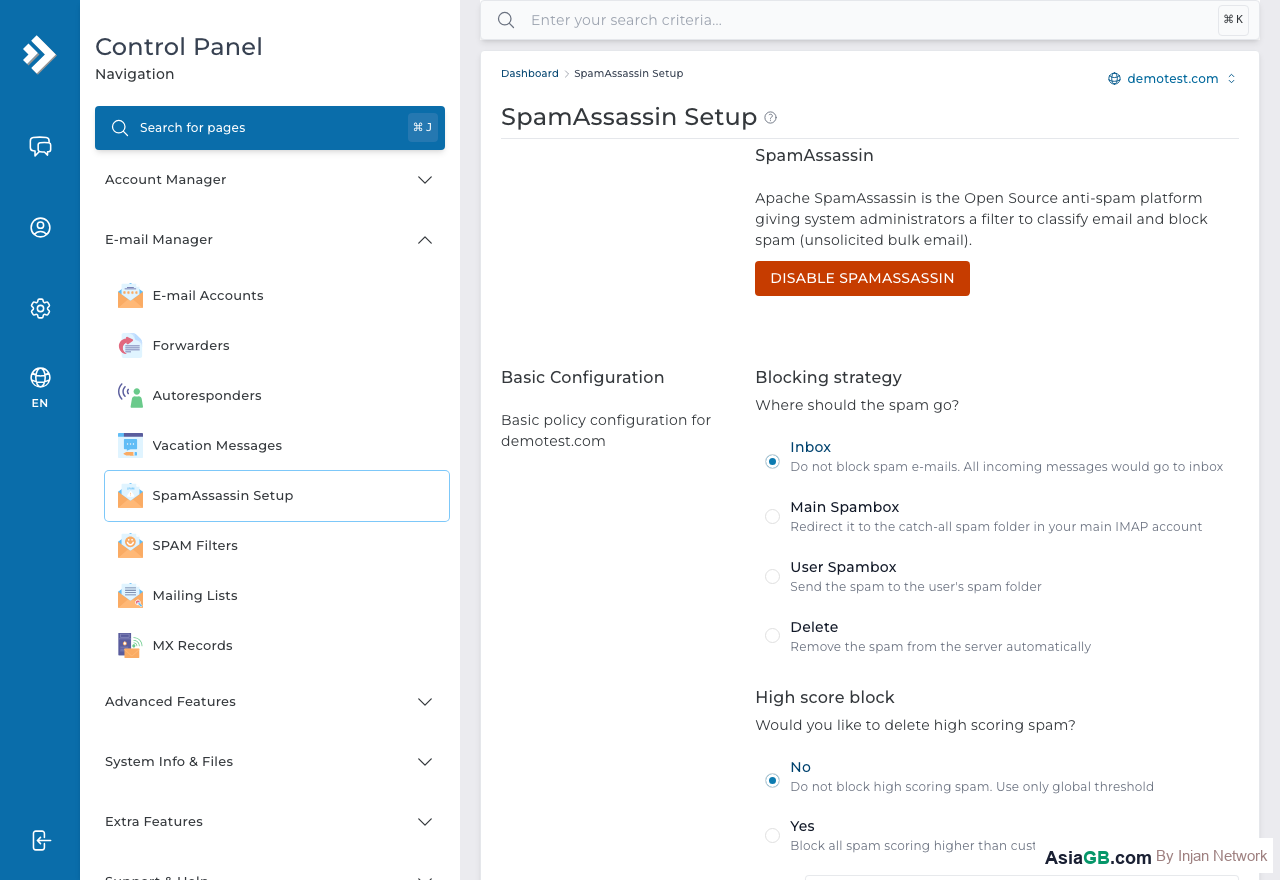
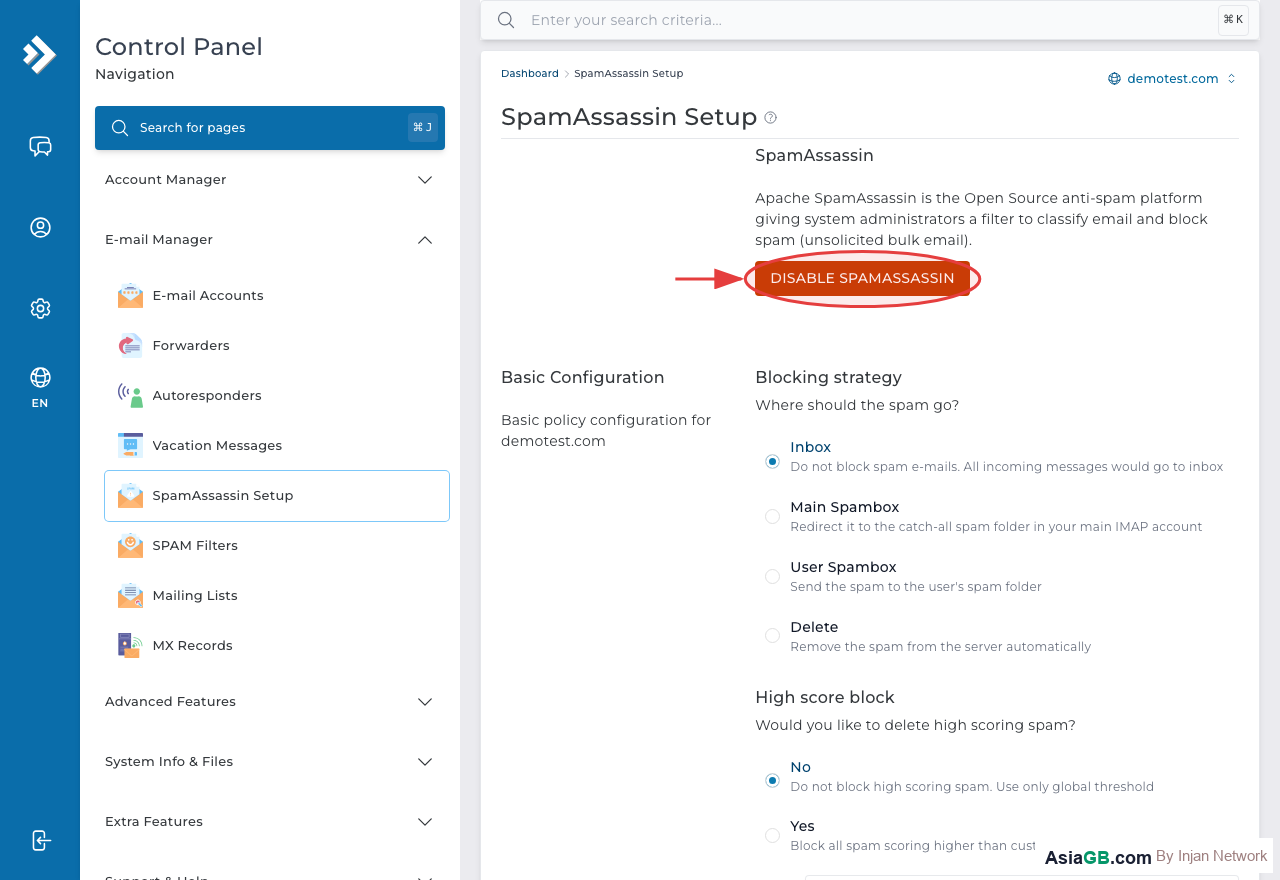
How to Enable SpamAssassin in DirectAdmin
- Log in to DirectAdmin and go to Email Manager.
- Click on SpamAssassin Setup.
- Check the box or toggle to Enable SpamAssassin.
- Configure the settings as described below.
- Click Save to activate.
Setting the Spam Score Threshold
The Required Score (or spam threshold) determines the minimum score at which SpamAssassin will take action. The default value is typically 5.0, which is a well-balanced setting for most users:
- Score below 5.0 (e.g., 3.0): More aggressive — catches more spam but may occasionally flag legitimate emails (false positives).
- Score at 5.0: Recommended for most business accounts — a good balance between catching spam and avoiding false positives.
- Score above 7.0: More permissive — fewer false positives but lets some spam through.
Start with 5.0 and adjust based on your experience. If you are receiving too many false positives (legitimate emails flagged as spam), increase the score slightly.
Actions for Spam Email
When SpamAssassin identifies a message as spam, you can choose from several actions:
- Delete: The message is silently discarded. Senders receive no notification. Use with caution as legitimate email can occasionally be deleted.
- Tag Subject: SpamAssassin adds a tag (e.g.,
***SPAM***) to the email subject line. The message is still delivered to your inbox — you can then set up an email client rule to move tagged messages to a junk folder. - Move to Folder: Spam messages are automatically placed in a designated spam or junk folder on the server, keeping your inbox clean while still allowing you to review them.
The safest approach for business use is to tag the subject or move to folder rather than delete, so you can check for false positives without losing important messages.
Blacklisting and Whitelisting Email Addresses
SpamAssassin allows you to manually control how specific senders are treated:
- Blacklist: Add a sender's email address or domain to ensure their messages always score as spam regardless of content. Example:
[email protected]or@badomain.comfor an entire domain. - Whitelist: Add trusted senders to ensure their messages are never flagged as spam. Useful for known suppliers, banks, or services whose emails are occasionally flagged incorrectly. Example:
[email protected].
Access these lists in the SpamAssassin Setup page under Blacklist and Whitelist sections. Enter one address per line.
SpamAssassin vs SPAM Filters — What Is the Difference?
DirectAdmin provides two distinct spam-fighting tools:
- SpamAssassin: An intelligent scoring engine that evaluates the full content, headers, and metadata of each message using hundreds of rules. Best for catching unknown, complex spam.
- SPAM Filters: Simple rule-based filters that block messages matching specific criteria you define — such as a particular sender address, subject keyword, or body text. Best for blocking known recurring spam that you have identified.
Using both tools together gives you the best protection.
Training the Bayesian Filter with Real Email Data
SpamAssassin's built-in Bayesian filter becomes significantly more accurate when trained on real email from your own domain. Generic training data provided with the software may not reflect the specific vocabulary, tone, and patterns used in your business communications. Training with your actual inbox data teaches the system what "normal" looks like for your organization, which greatly improves accuracy over time.
Using the sa-learn Command
The sa-learn command is the primary tool for training the Bayesian database. Users with shell access can run it directly:
- Train spam:
sa-learn --spam /path/to/spam/folder— teaches SpamAssassin that the emails in this folder are spam. - Train ham (legitimate email):
sa-learn --ham /path/to/inbox/folder— teaches SpamAssassin that these are normal, non-spam messages. - Recursive training (entire directory):
sa-learn --spam --dir /path/to/spam/ - Check Bayesian database statistics:
sa-learn --dump magic— shows how many tokens have been learned and whether the Bayesian filter is active.
SpamAssassin requires a minimum of 200 emails in both the spam and ham categories before the Bayesian filter activates. For best results, aim for 1,000 or more examples in each category. The more training data you provide, the more accurately the system can distinguish spam from legitimate mail.
Effectiveness Timeline for Bayesian Training
Bayesian training is a gradual process — results improve steadily over time:
- Weeks 1–2: The system accumulates data. You may not notice much difference yet.
- Weeks 3–4: Once 200+ examples are collected, the Bayesian filter becomes active and starts influencing scores.
- Months 2–3: Accuracy improves noticeably, especially for spam types that rule-based filters miss.
- 6+ months: A well-maintained Bayesian database can catch the majority of spam with minimal false positives.
Ongoing Maintenance of SpamAssassin Filter Rules
Spam tactics evolve constantly. What worked six months ago may be less effective today because spammers regularly change their methods to evade filters. Regular maintenance ensures your SpamAssassin configuration stays effective over time.
- Retrain monthly: Collect spam messages that slipped through during the month and run
sa-learn --spamon them to improve the Bayesian database. - Review whitelists and blacklists quarterly: Remove addresses that are no longer relevant and add new entries as your supplier and partner list changes.
- Adjust score thresholds seasonally: During high-volume marketing periods such as sales events or holidays, you may want to temporarily tighten or loosen the Required Score based on the spike in email volume.
- Check RBL health: Some Realtime Blackhole Lists are discontinued or experience downtime. Verify that the RBLs SpamAssassin uses are still active and maintained.
- Sync the Bayesian database: Run
sa-learn --syncperiodically to clean up outdated tokens and maintain database efficiency.
A SpamAssassin setup that is actively maintained and regularly retrained will consistently outperform one that is left at default settings. The investment of a few minutes of maintenance each month can prevent hours of frustration from dealing with spam in your inbox or missed legitimate email.
Recommended Score: 5.0 — This is the safest default setting for most business email accounts. It blocks the majority of spam while keeping false positive rates low. Avoid setting the score below 3.0 as you risk blocking legitimate transactional emails such as order confirmations, bank notifications, or shipping alerts from e-commerce platforms.
Protect Your Inbox with Quality Hosting
AsiaGB hosting plans include SpamAssassin, SPAM Filters, and professional email features to keep your inbox clean and secure.
View Hosting Plans