
Login Keys in DirectAdmin are a powerful security feature that allows you to authenticate to your control panel without using a password. Instead of typing a username and password combination, you use a special URL that contains a unique cryptographic key. This approach is far more secure for automated scripts, deployment pipelines, monitoring systems, and any situation where a password might otherwise be embedded in a configuration file.
What Are Login Keys?
A Login Key is a token-based authentication mechanism built into DirectAdmin. When you create a login key, DirectAdmin generates a unique URL that grants access to your account when opened in a browser. You can configure each key with specific permissions, restrict it to certain IP addresses, and set an expiration date. The key never reveals your actual password and can be revoked at any time without changing your main account password.
Benefits Over Passwords
- No password exposure — login keys cannot be used to derive or reveal your actual password
- Revocable — you can delete a login key at any time without affecting other keys or your main login
- IP restriction — keys can be locked to specific IP addresses, so even if the key URL is leaked, it cannot be used from an unauthorized location
- Expiry control — set keys to expire after a specific date, reducing risk from forgotten automation tokens
- Audit-friendly — each key can be labeled, making it easy to track which system is using which key
- Ideal for automation — scripts, monitoring tools, and CI/CD pipelines can authenticate without storing your real password
How to Create a Login Key
- Log in to DirectAdmin and navigate to Your Account.
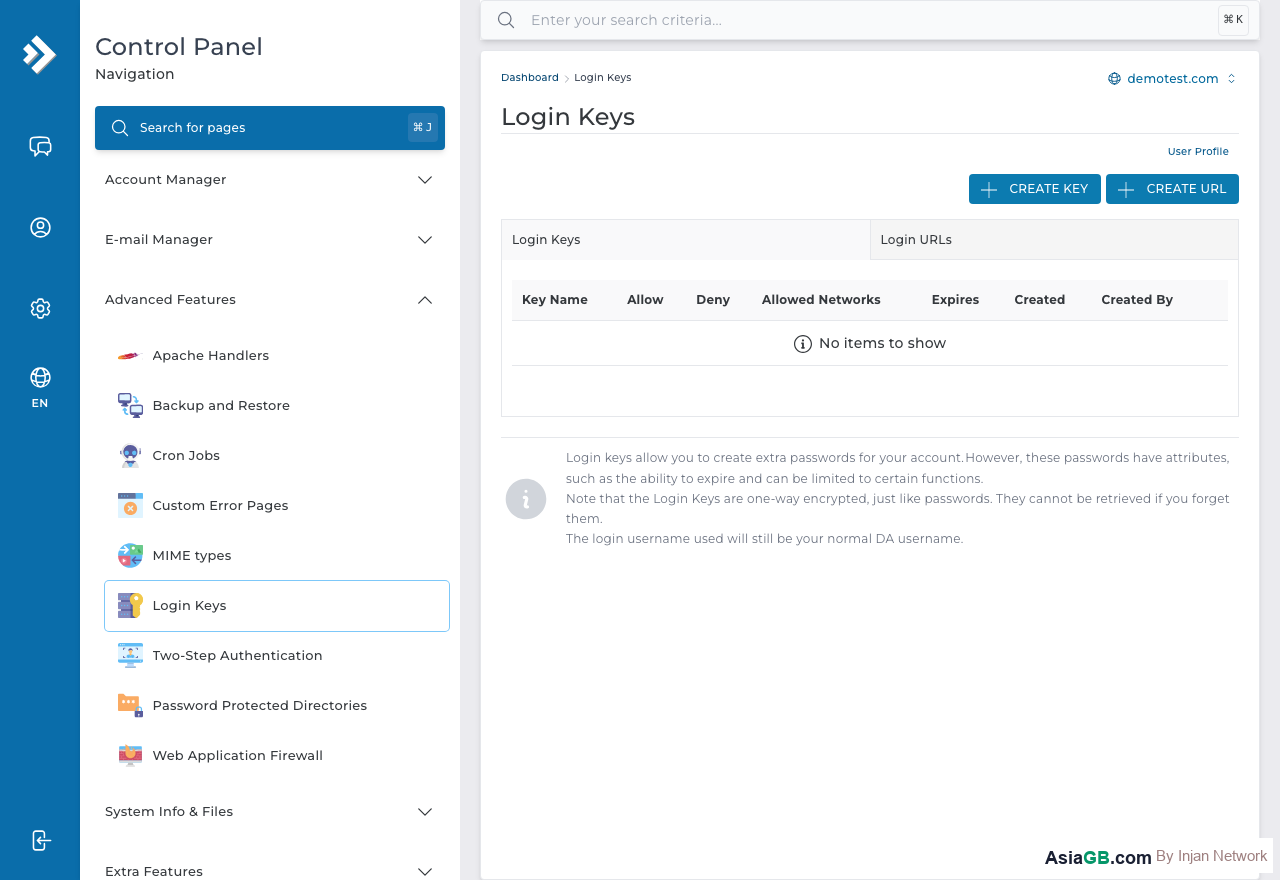
- Click on Login Keys (or look under Advanced Features → Login Keys depending on your DirectAdmin version).
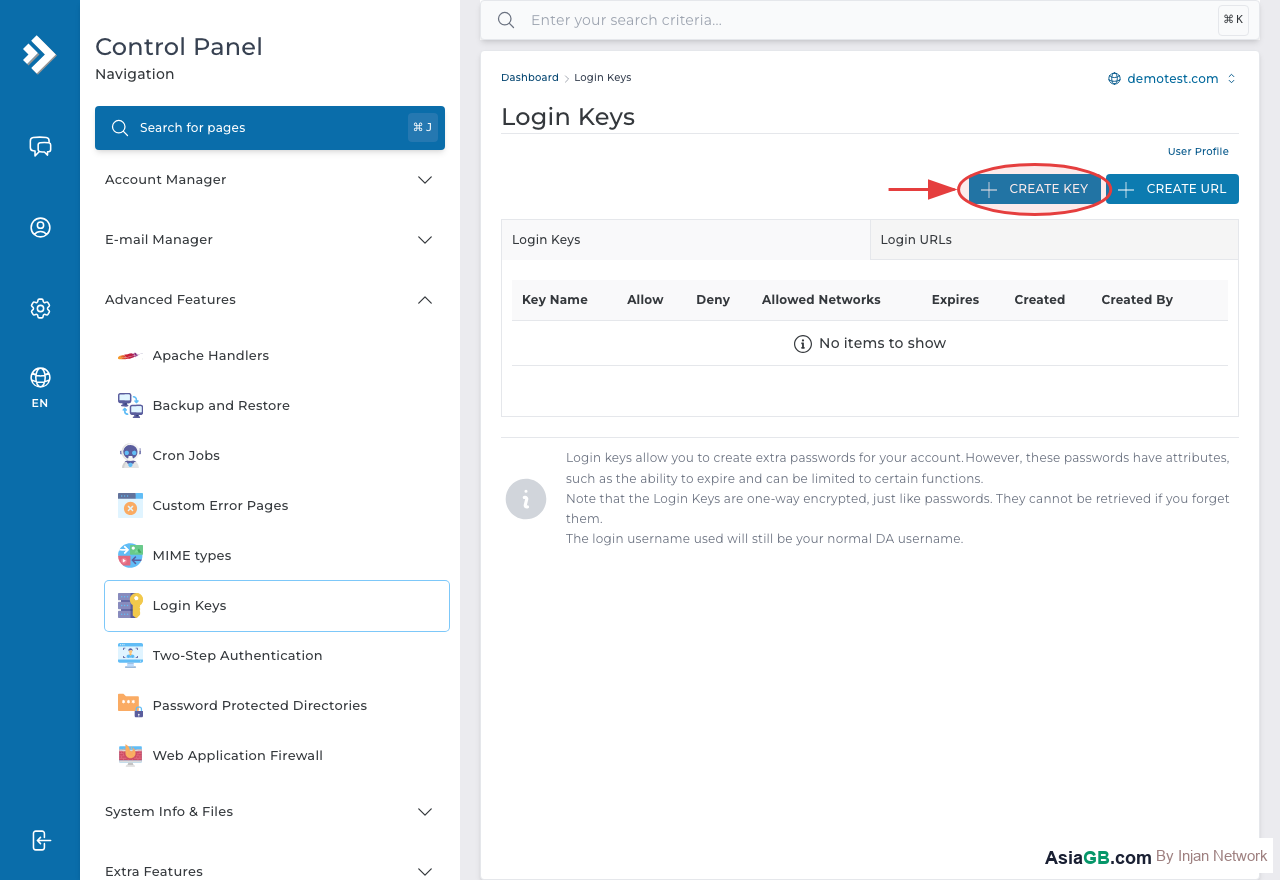
- Click Create Login Key.
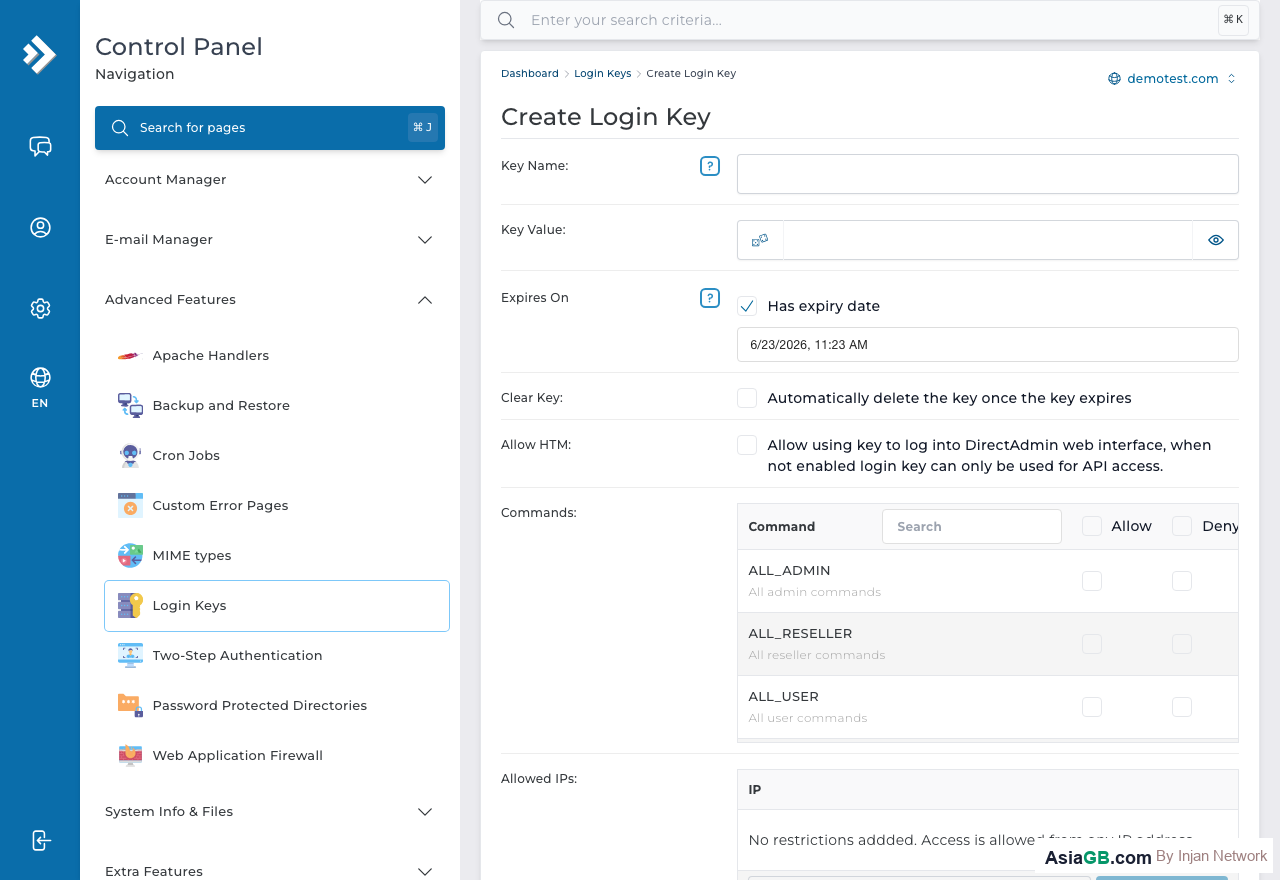
- Enter a descriptive name for the key so you can identify it later (e.g., "Monitoring Script" or "Backup Automation").
- Set the expiry date if you want the key to expire automatically — leave blank for no expiry.
- Optionally restrict the key to specific IP addresses in the Allowed IPs field.
- Select the permissions level for this key — you can limit it to read-only or allow full control.
- Click Create. DirectAdmin will generate the login key URL.
- Copy and store the login key URL securely — it will not be shown again.
Setting an IP Allowlist
The IP allowlist is one of the most important security features of login keys. When you enter an IP address (or range) in the allowed IPs field, the login key will only work when accessed from that specific IP. This means even if someone obtains the key URL, they cannot use it unless they are connecting from your authorized IP address. For server automation, enter your VPS or dedicated server's IP. For personal access, enter your office or home static IP.
How to Log In Using a Login Key
Using a login key is simple — the key URL already contains all the authentication information. Open the login key URL in your browser and DirectAdmin will authenticate you automatically without prompting for a username or password. You are logged in instantly. For automation scripts, you can use this URL with curl or similar tools to trigger DirectAdmin API actions programmatically.
Login Key Permissions: Choosing the Right Access Level
Not all login keys need full access to your DirectAdmin account. DirectAdmin allows you to create keys with different permission scopes depending on what the key is intended for. Choosing the least-privileged access level is a fundamental security principle — give automation scripts only the permissions they actually need, nothing more.
- Full Access Key — equivalent to your main account login. Can perform any action available to your account. Should always have an IP restriction and an expiry date set.
- API-Only Key — restricted to DirectAdmin's API endpoints. Cannot be used to log in through the web interface. Ideal for server automation scripts and deployment pipelines.
- Read-Only Key — can query information but cannot make changes. Perfect for monitoring tools that only need to check account status, usage statistics, or resource availability.
When creating a key for a third party — such as a developer or a temporary support engineer — always create a scoped key with a short expiry rather than sharing your main password. When their work is done, simply delete the key. Your account remains intact and your password has never been shared.
Using Login Keys with the DirectAdmin API
The most powerful use case for login keys is integration with the DirectAdmin API for automated server management. Rather than encoding your real password into a configuration file or environment variable, you use a login key that can be revoked at any time without affecting your main account credentials.
Example cURL API Calls
The DirectAdmin API uses standard HTTP requests. Pass your username and login key as HTTP Basic Auth credentials using curl:
- List domains:
curl -s "https://yourdomain.com:2222/CMD_API_SHOW_DOMAINS" -u "username:YOUR_KEY" - List email accounts:
curl -s "https://yourdomain.com:2222/CMD_API_POP?action=list&domain=example.com" -u "username:YOUR_KEY" - Create subdomain:
curl -s -d "action=create&domain=sub.example.com" "https://yourdomain.com:2222/CMD_API_SUBDOMAIN" -u "username:YOUR_KEY" - Get disk usage:
curl -s "https://yourdomain.com:2222/CMD_API_QUOTA" -u "username:YOUR_KEY"
These API calls can be embedded in shell scripts, Python automation scripts, or CI/CD pipeline stages. Since the login key can be revoked independently of your password, you can safely rotate keys during routine maintenance without redeploying your entire automation infrastructure.
Using Keys in Python Scripts
For Python-based automation, use the requests library with HTTP Basic Auth. Pass your DirectAdmin username as the auth username and the login key as the password. Always use HTTPS and verify SSL certificates in production environments to prevent man-in-the-middle attacks.
Revoking a Login Key When Compromise Is Suspected
If you notice unusual API activity, receive a security alert, or discover that a login key URL has been accidentally committed to a public repository, act immediately. The speed of your response directly determines how much damage can be done with the compromised key.
Incident Response Steps
- Log in to DirectAdmin immediately using your main username and password.
- Navigate to Advanced Features > Login Keys.
- Delete the suspect key immediately by clicking Delete. The key URL becomes invalid instantly — there is no delay.
- Review your DirectAdmin access logs and website error logs to identify any unauthorized actions taken with the compromised key.
- Change your main account password as an additional precaution, even though the login key cannot reveal your password.
- Audit all other login keys and delete any that are no longer in active use.
- Create a replacement key with a stricter IP allowlist and a shorter expiry period.
The key advantage of login keys over passwords in incident response is speed: you can revoke a specific key without affecting your main login or other automation systems that use different keys. This granular control makes incident containment much faster and more targeted than a full password reset.
Login Key Best Practices Summary
A well-managed set of login keys significantly reduces your attack surface. Here is a summary of best practices to keep your DirectAdmin account secure while still benefiting from the convenience of token-based authentication:
- Name keys descriptively — use names like "Monitoring-2026-Q2" or "Backup-Script-Prod" so you can immediately identify what each key is for during an audit.
- Always set IP restrictions — if the system using the key has a static IP, restrict the key to that IP. Even a single IP restriction dramatically reduces the usability of a leaked key.
- Set expiry dates — especially for keys issued to external parties. Automatic expiry is your safety net when you forget to manually revoke a key.
- Never store keys in version control — use environment variables, secrets managers, or encrypted configuration files instead of hardcoding keys in source code.
- Rotate keys periodically — review all active keys every three to six months. Delete unused keys and create fresh replacements for active ones.
- Use the minimum required permissions — do not use a full-access key for a monitoring script that only needs to read data.
- Monitor access logs — review DirectAdmin access logs regularly for unusual API call patterns or access from unexpected IP addresses.
Deleting Login Keys
To revoke a login key, go to Login Keys in DirectAdmin, find the key you want to delete in the list, and click Delete. The key is immediately invalidated — any URL using that key will no longer work. This is useful when a contractor's access ends, an automation system is decommissioned, or you suspect a key has been compromised.
Best Practice: Login keys are significantly better than passwords for automated system access. Never embed your DirectAdmin password in scripts or configuration files — always use a login key with the minimum required permissions and an IP restriction. This way, even if your server is compromised, the key cannot be used from another location.
DirectAdmin Hosting with Advanced Security
AsiaGB hosting plans include DirectAdmin with login keys, 2FA, IP restriction, and all advanced security features to keep your account protected.
View Hosting Plans