
Apache Handlers are directives that tell the Apache web server how to process files based on their file extension. When a visitor requests a file ending in .php, .cgi, or .pl, Apache checks its handler configuration to decide which program should process that request before returning a response. DirectAdmin provides a straightforward interface to manage these handlers for your domain without editing server configuration files manually.
What Are Apache Handlers?
A handler is essentially a mapping between a file extension and a processing program. Apache ships with several built-in handlers and supports custom ones. When you define a handler, you are telling the server: "When someone requests a file with this extension, pass it to this program." Without the correct handler, the server may serve the raw source code of a script to the browser instead of executing it — a security risk and a functional failure.
Handlers are most commonly used for:
- Enabling CGI scripts (
.cgi,.pl) to execute as programs - Routing PHP files through a specific PHP version or processor
- Defining how server-side includes work
- Handling custom script types for less common languages
Common Handler Types
cgi-script
The cgi-script handler tells Apache to execute the file as a CGI program rather than serve it as a plain text file. This handler is typically applied to files with extensions .cgi and .pl (Perl scripts). The script runs on the server and its output is sent to the browser. CGI scripts must have executable permissions (chmod 755) to work.
php-script
On many servers, a php-script handler (or a variant like application/x-httpd-php) maps .php files to the PHP interpreter. In DirectAdmin environments using PHP-FPM or SuPHP, the handler configuration may differ slightly, but the concept is the same — the extension is linked to a PHP processing engine.
server-parsed
The server-parsed handler enables Server-Side Includes (SSI) for files with extensions like .shtml. SSI allows you to include content from other files dynamically at the server level before sending the page to the browser.
How to Access Apache Handlers in DirectAdmin
- Log in to your DirectAdmin control panel.
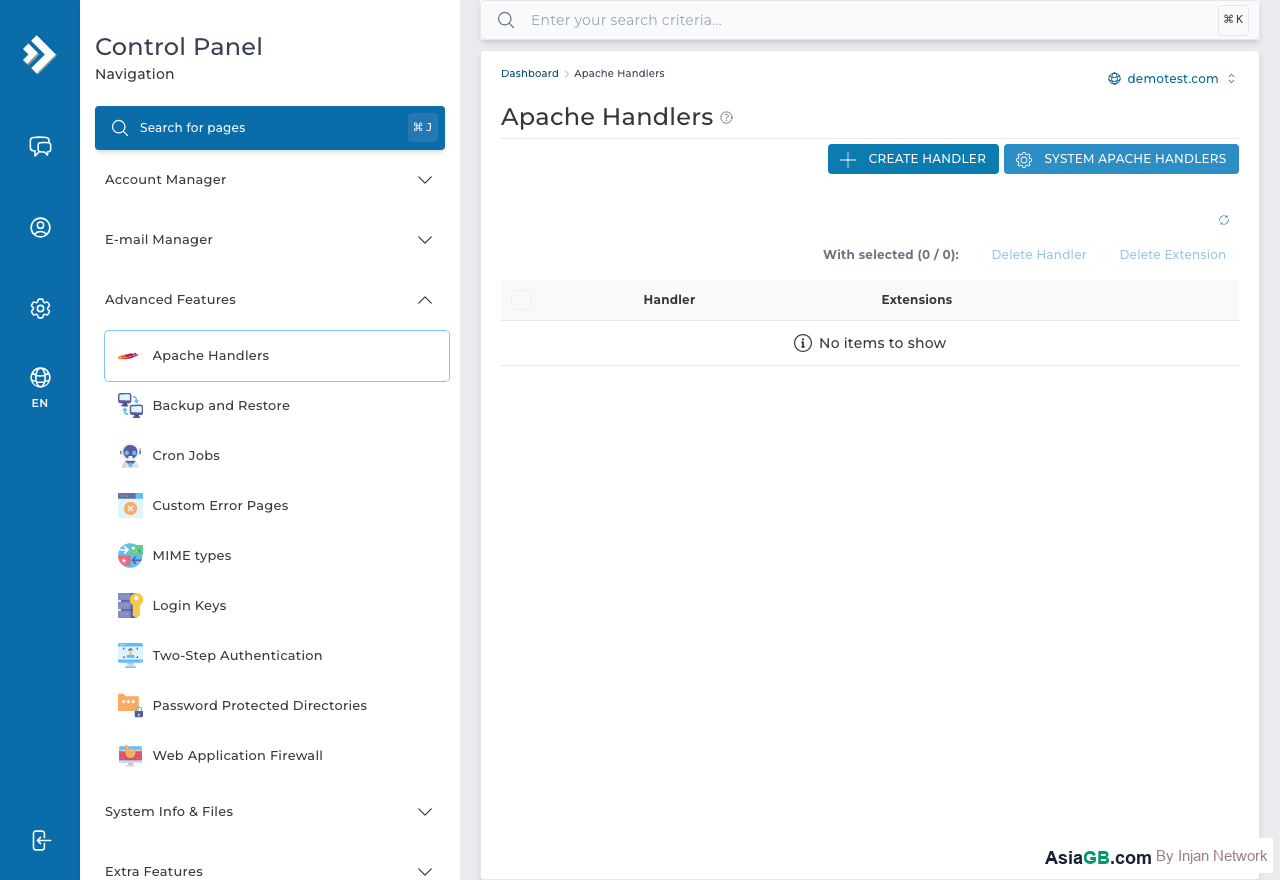
- Under the Advanced Features section, click Apache Handlers.
- You will see a list of currently defined handlers for your account, along with a form to add new ones.
How to Add a Custom Handler
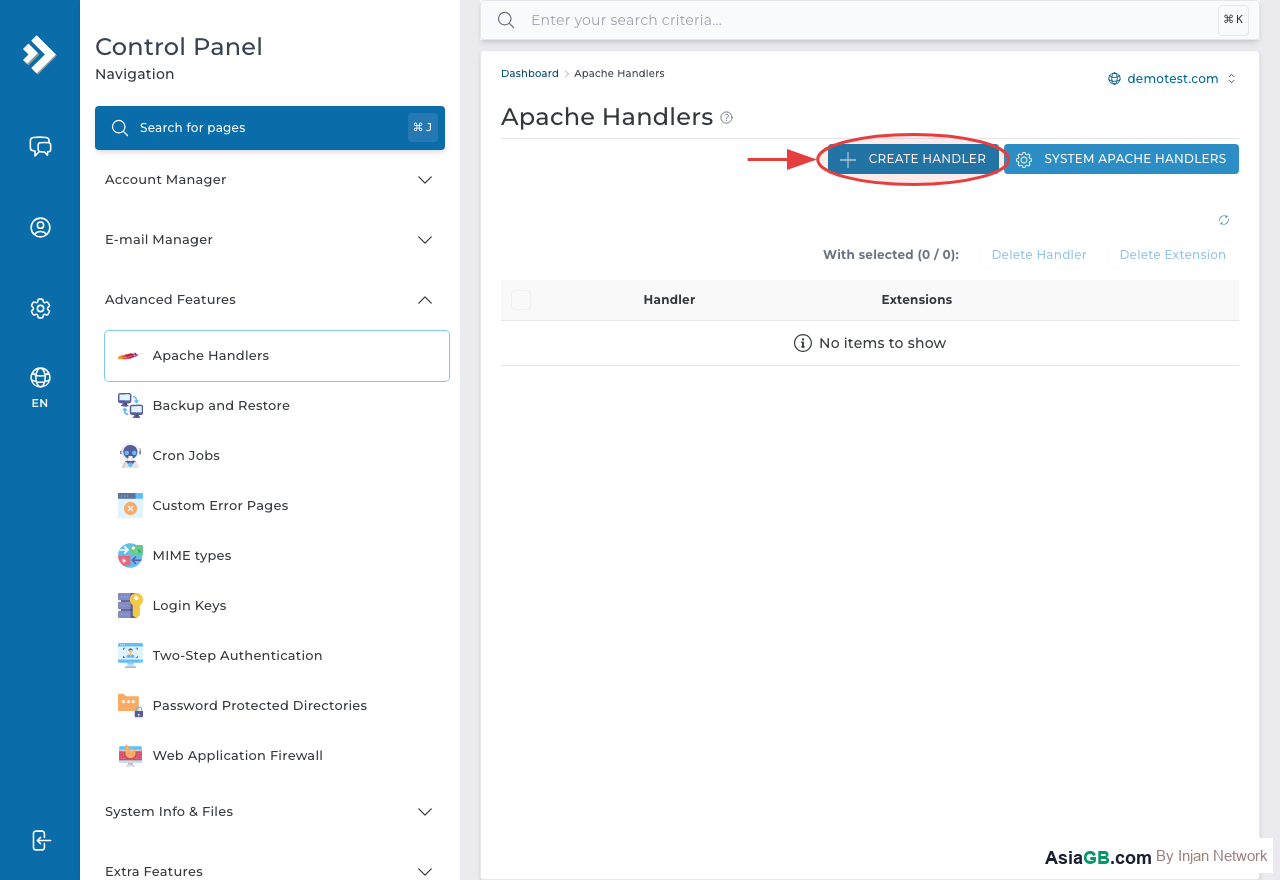
- In the Apache Handlers page, locate the Add Handler form at the bottom of the page.
- In the Handler field, enter the handler name — for example,
cgi-script. - In the Extension(s) field, enter the file extension(s) you want to associate, such as
.cgior.pl. You can enter multiple extensions separated by spaces. - Click Add to save the handler.
- The handler will now be active for all files with that extension in your account.
Practical Examples
Enabling CGI Scripts (.cgi)
If your web application uses CGI scripts — common in older contact forms, counters, or forum software — you need to map .cgi to cgi-script. Without this handler, Apache will serve the raw script text instead of executing it. After adding the handler, make sure your CGI files are uploaded to the cgi-bin folder and have chmod 755 permissions.
Enabling Perl Scripts (.pl)
Perl scripts ending in .pl also require the cgi-script handler. The process is identical: add an entry with handler cgi-script and extension .pl. Ensure the first line of your Perl script contains the correct shebang path to the Perl interpreter, typically #!/usr/bin/perl.
Custom PHP Processing
In some configurations, you may want to run files with a non-standard extension — such as .php7 or .phtml — through the PHP processor. You can add a handler for application/x-httpd-php mapped to your custom extension. This is useful when running legacy applications that use non-standard PHP file extensions.
How to Remove a Handler
To delete an existing handler in DirectAdmin, go to the Apache Handlers page, find the handler you want to remove in the list, and click the Delete or checkbox-select option next to it, then confirm the deletion. The handler will be removed immediately and the associated files will revert to default server behavior.
Note: Default server settings already handle PHP and common file types correctly. You only need to add custom Apache Handlers when working with CGI scripts, Perl, or non-standard file extensions. Changing default PHP handlers incorrectly can break your website — always test on a staging environment first.
Apache Handler Types You Should Know
Apache ships with several built-in handlers and supports custom ones. Understanding each type will help you choose the right handler for your use case and avoid configuration mistakes that can break your site.
CGI Handler (cgi-script)
The cgi-script handler is the most common handler you will need to add manually. It instructs Apache to execute the file as a CGI program rather than serving its contents as plain text. Files with extensions .cgi and .pl (Perl scripts) are the most common targets. For the handler to work, the script must be executable (chmod 755) and usually located in the cgi-bin directory.
PHP Handler (application/x-httpd-php)
On most shared hosting servers, a application/x-httpd-php handler (or a variant) is pre-configured for .php files. You would add a custom PHP handler only if you need non-standard extensions — such as .php7 or .phtml — to be processed by the PHP engine. This is occasionally needed for legacy PHP applications that use non-standard file extensions.
SSI Handler (server-parsed)
The server-parsed handler enables Server-Side Includes (SSI) for files using the .shtml extension. SSI allows you to embed directives directly in HTML files, such as including the contents of another file or displaying the current date, before the page is sent to the browser. It is lighter than PHP for simple includes but less powerful.
Custom MIME Type Handlers
For unusual file types not recognized by default, you can map a MIME type to a file extension using a handler. For example, mapping .dat to application/octet-stream forces the browser to download the file rather than display it. This is also useful for ensuring API response files or proprietary formats carry the correct Content-Type header.
Configuring PHP Handlers for Different PHP Versions
When your hosting environment supports multiple PHP versions, handler configuration controls which PHP version processes specific file extensions. This is particularly useful when running older applications that require PHP 7.x alongside newer applications targeting PHP 8.x.
PHP 7.x via FastCGI
In environments using PHP-FPM or FastCGI, the handler name for PHP 7.x varies by server configuration. It may appear as application/x-httpd-php7, fcgid-script, or a custom handler name defined by the hosting provider. Check with support to confirm the exact handler string for PHP 7.x on your server. Using the wrong handler name will cause the file to be served as plain text instead of being executed.
PHP 8.x via FastCGI
PHP 8.x is typically the default handler on modern servers. In DirectAdmin, the recommended way to switch PHP versions is through the PHP Version Manager under Domain Setup — this updates the handler automatically for your entire domain. Manually adding a handler for PHP 8.x is only necessary when you want specific non-standard extensions (such as .php8) to also be processed by PHP.
Using .htaccess for Per-Directory Handler Overrides
Handlers can also be set in a .htaccess file using the AddHandler directive — for example, AddHandler cgi-script .cgi .pl. The advantage of this approach is that it applies only to the directory containing the .htaccess file and its subdirectories, leaving other parts of your site unaffected. This is ideal for enabling CGI in a single subdirectory without changing the account-wide handler settings in DirectAdmin.
Troubleshooting Apache Handler Problems
If your handler is configured correctly in DirectAdmin but files are still not processing as expected, work through these common causes systematically.
Check the Apache Error Log
Most handler problems produce a log entry. In DirectAdmin, access your error log through Statistics & Logs → Error Log. Common messages include Options ExecCGI is off (CGI execution not enabled for that directory), Premature end of script headers (the script is not outputting a valid HTTP header before its content), or Internal Server Error for syntax issues in the script itself.
Resolving .htaccess Conflicts
If multiple .htaccess files exist along the directory path, conflicting AddHandler, RemoveHandler, or SetHandler directives can override your settings. Apache processes .htaccess files from the document root downward, and the most specific (deepest) file wins for each directive. Check all .htaccess files in the path from your domain root to the target directory and remove any conflicting handler directives.
File Permissions for CGI Scripts
CGI and Perl scripts must have execute permission (chmod 755). If permissions are 644 (read-only for others), Apache will refuse to execute the script and return a 403 Forbidden error or serve the raw script source. Set the correct permissions via the DirectAdmin File Manager or your FTP client before testing.
Verifying the Handler is Active
After adding a handler in DirectAdmin, verify it appears in the list on the Apache Handlers page. Then test the file in your browser using a hard refresh (Ctrl+Shift+R on Windows/Linux, Cmd+Shift+R on Mac) to bypass any cached responses. If the handler still does not appear active, double-check that the extension you entered exactly matches the file extension of your script, including the leading dot.
Apache Handlers vs mod_rewrite — Key Differences
Developers sometimes confuse Apache Handlers with mod_rewrite rules because both can be configured in .htaccess. Understanding where each operates in Apache's request processing pipeline makes it clear which tool to use for each situation.
Handlers Operate at the Content Generation Phase
Apache processes each request in multiple stages. Handlers come into play during the content generation phase — after Apache has already located the file on disk and determined it needs to serve it. A handler tells Apache: "This file exists; now use this program to generate the response." Handlers do not affect how URLs are parsed or which file is selected.
mod_rewrite Operates at the URL Translation Phase
mod_rewrite intervenes much earlier — during the URL translation phase, before Apache even looks for a file. It takes the incoming URL, applies your rewrite rules, and can map it to a completely different internal path. For example, /about can be rewritten to index.php?page=about without the visitor ever seeing the internal path. mod_rewrite never directly affects how file content is processed — it only determines which file Apache will look for.
Choosing the Right Tool
- Want
.cgior.plfiles to execute as programs → use Apache Handler - Want clean, SEO-friendly URLs like
/blog/my-post→ use mod_rewrite - Want to hide the
.phpextension from URLs → use mod_rewrite to strip the extension; the PHP handler then processes the file normally - Want
.htmlfiles to be parsed by PHP → use Apache Handler to assign them a PHP MIME handler - Want to redirect old URLs to new ones permanently → use mod_rewrite with a 301 flag
Hosting with Multi-PHP Version Support
AsiaGB hosting plans include DirectAdmin with full Apache Handler control, multiple PHP versions, and CGI support built in.
View Hosting Plans